
Permissions & The Three Pauses
Autonomous agents must never destroy code, wipe databases, or execute unauthorized terminal commands. Smoke Monkey introduces The Three Interactive Pauses: non-blocking suspension gates that freeze the loop without crashing the process.
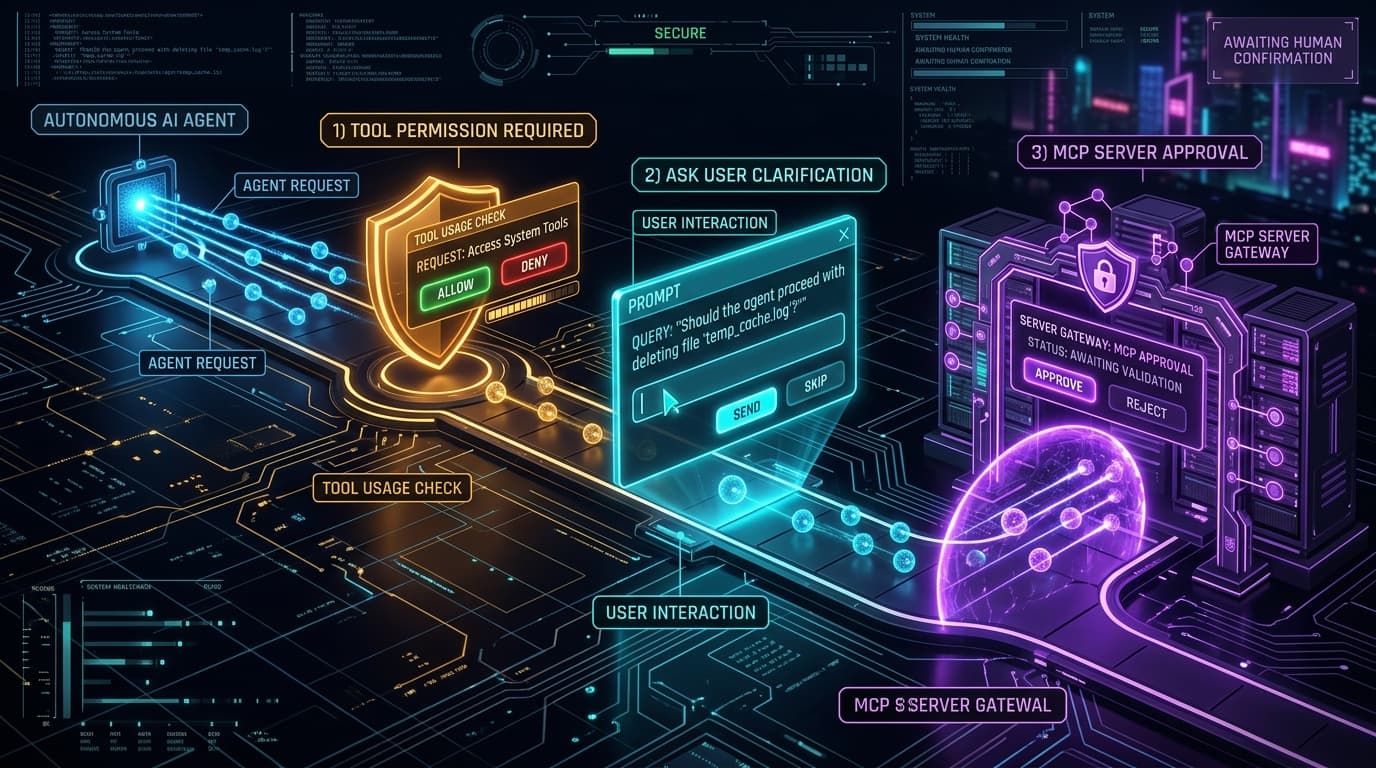
Interactive Pause Protocol Flow
Explore how each pause gate suspends execution non-blockingly until developer confirmation:
The 3 Pause Gates Explained
1. Tool Permission Pause
Triggered whenever the agent invokes mutating actions (write_file, edit_file, run_command, delete_file).
Suspends the loop. Read-only actions (read_file, glob, grep) execute immediately without prompting.
agent.resolvePermission(toolCallId, 'allow' | 'deny')2. Clarification Pause
Triggered when the agent calls the built-in ask_user tool to seek human input or clarify ambiguous instructions.
Freezes execution state and turns the chat composer into an active answer input.
agent.respond(toolCallId, userReplyString)3. MCP Server Approval Pause
Triggered when the agent attempts to call a tool from an untrusted or disabled external MCP server.
Suspends execution until the server is explicitly vetted and enabled.
agent.resolveMcpDecision(toolCallId, { action: 'enable', names: [serverId] })Wiring Pauses in TypeScript
Listen to pause events on the agent instance and resolve them over WebSockets, CLI prompts, or webhooks:
import { createAgent } from '@smoke-monkey/harness';const agent = createAgent({workspacePath: process.cwd(),autoApprove: false, // Enforce strict human verification});// 1. Tool Permission Pauseagent.on('permission.required', async (e) => {const { toolCallId, toolName, input } = e.data;console.log(`Agent wants to execute: ${toolName}`);const approved = await showConfirmationModal(toolName, input);await agent.resolvePermission(toolCallId, approved ? 'allow' : 'deny');});// 2. User Clarification Pauseagent.on('ask_user.required', async (e) => {const { toolCallId, question } = e.data;const answer = await getUserPromptReply(question);await agent.respond(toolCallId, answer);});// Run an autonomous coding taskawait agent.run('Refactor src/auth.ts to use argon2 instead of bcrypt');
Graceful Denial & Self-Healing
When a user clicks Deny, the harness does not crash. Instead, the rejection is cleanly passed back to the model as an error response (Permission denied by user), allowing the agent to formulate an alternate strategy without editing that file.